
8 minutes
Generics and Interfaces
TL;DR — This lesson reads generics (
<T>) and interfaces right from the framework's source code: the EventBusThe @babylonjsmarket/ecs messaging system any part of a game emits to and listens on, decoupled from direct references.'semit<T>andMap<string, Set<EventCallback>>, theISystemQuerycontractAn agreed shape that many different values can promise to match, named once and checked everywhere., and the renderer's opaque branded handles. Skip it if generics and interfaces already feel easy. It shows them in real code but teaches no new language feature.
Last lesson ended on a real published componentPure data bolted onto an entity — a Position (x, y, z), a Health (hit points) — holding state, no behavior.. KeyboardMover turned out to be plain Counter with extends Component on the front. It had the same fields, constructor, and methods that every class in @babylonjsmarket/ecs shares. Reading those classes showed us the shape of the framework. But two pieces of it stayed unexplained.
The EventBus lets anyTypeScript's escape hatch that switches off type checking for a value, buying reuse at the cost of safety. part of a game talk to any other part. One part sends out "the score changed," and another part listens for it. But the EventBus was written years before your game existed. It does not know what a score looks like. It does not know about a damage event or a "player jumped" event either. It has to carry whatever data you hand it. And it still has to catch the moment you type data.scor instead of data.score. The same framework has a second piece too. It draws boxes and moves cameras without naming a single 3D library. So the same game can run in Babylon.js or Three.js with a one-line swap. Those are the two main 3D engines for the web. How does one definition stay type-safe for data it has never seen? And how does one contract work for engines it was never written for?
Two ideas answer both questions. Generics keep code safe across different types. Interfaces keep code open across different implementations. Once these two ideas click, most of what looked like framework magic turns plain.

One piece of code, many types
Picture a helper that takes a value and hands it right back. It is useless on its own, but it shows the problem clearly. You want it to work for a number, a string, an object — anything at all. Fresh from the types lesson, your first idea might be to write one version per type.
The body is the same in both. Only the type changes. So you reach for any.
This compiles fine. But score is the number 10, and .toUpperCase() is a string method. Calling a string method on a number crashes at runtimeWhen the program is actually running, as opposed to compile time — when TypeScript checks the code before it ever runs.. Runtime means when the game is actually running, not when TypeScript checks your code beforehand. any means "stop checking this, trust me." So you got reuse but threw away the safety net. Every approach so far gives up one of the two columns.
| Approach | Reuse (one definition) | Safety (catches your typo) |
|---|---|---|
One function per type (firstNumber, firstString, …) | No — you rewrite the body each time | Yes |
any | Yes | No — checking is switched off |
Generic <T> | Yes | Yes |
We want both. We want to write it once. And we want TypeScript to still know that a number in means a number out. Generics give you both.
<T> is a variable for a type
The same helper, done right.
The new piece is <T>. The angle brackets add a type parameterThe named placeholder for a type, written in angle brackets (the T in <T>), that a generic stands in for until you supply a real type.. A type parameter is a placeholder for a type. It works like a normal parameter, just one level up. value holds whatever value you pass in. T holds whatever type you pass in.
T is just a name. People usually write T, and sometimes K, V, or U for a second or third one. Call identity(10) and TypeScript decides T is number. Call it with "Aria" and T is string. TypeScript read the type from the argument. That is inferenceTypeScript working out a type for you from context, so you don't have to write it down., the same habit from Lesson 2, now working on types instead of values. You rarely write identity<number>(10) by hand. But with events you will often spell T out. On the listen side, on has nothing to infer the type from, because the callback's data has no type written on it. Spelling T on emit too keeps both sides naming the same shape.
How the EventBus uses generics
Here is the framework's real callback type. It is the first line of EventBus.ts.
EventCallback<T> is a genericA definition written with a placeholder type, so one piece of code stays type-safe for whatever type you fill in. type alias. It is a function that takes one argument, data, of type T, and returns nothing. Fill in the T and you get a specific callback. EventCallback<{ score: number }> takes an object with a score. The = any is a default. Leave T unset and it falls back to any, so old untyped code still works.
The method that sends an event carries its own <T>. Here is the real signature, straight from the source.
Read it as a sentence. emit takes a type (the event name, a string) and an optional data of type T, and it returns nothing. The <T> right after the method name is the generic. SetThe built-in collection of unique values, written Set<T> — each value of type T appears at most once. it where you call the method, and data must match. Now watch T flow from an emit to the listen that catches it. (bus here is an EventBus made earlier, and console.log prints to the console.)
Two things look almost the same here but mean different things. { score: number } in the angle brackets is the type: a score that is some number. { score: 10 } passed as the argument is the real value you send. Writing on<{ score: number }>(...) sets T. That flows into the callback's EventCallback<T>, so data is fully typed and autocomplete offers data.score. Make a typo:
TypeScript catches scor before the game runs. The EventBus was written long before your score.changed event existed. Even so, it hands you a typed data and flags the typo. That is exactly what any could never do.
You've already been using generics
Generics are not some advanced corner of the language. You have used them since your very first array.
| Generic | Reads as | What it holds |
|---|---|---|
Array<T> | "an array of T" | Elements all of type T. number[] is shorthand for Array<number> |
Set<T> | "a set of T" | Unique values, all of type T |
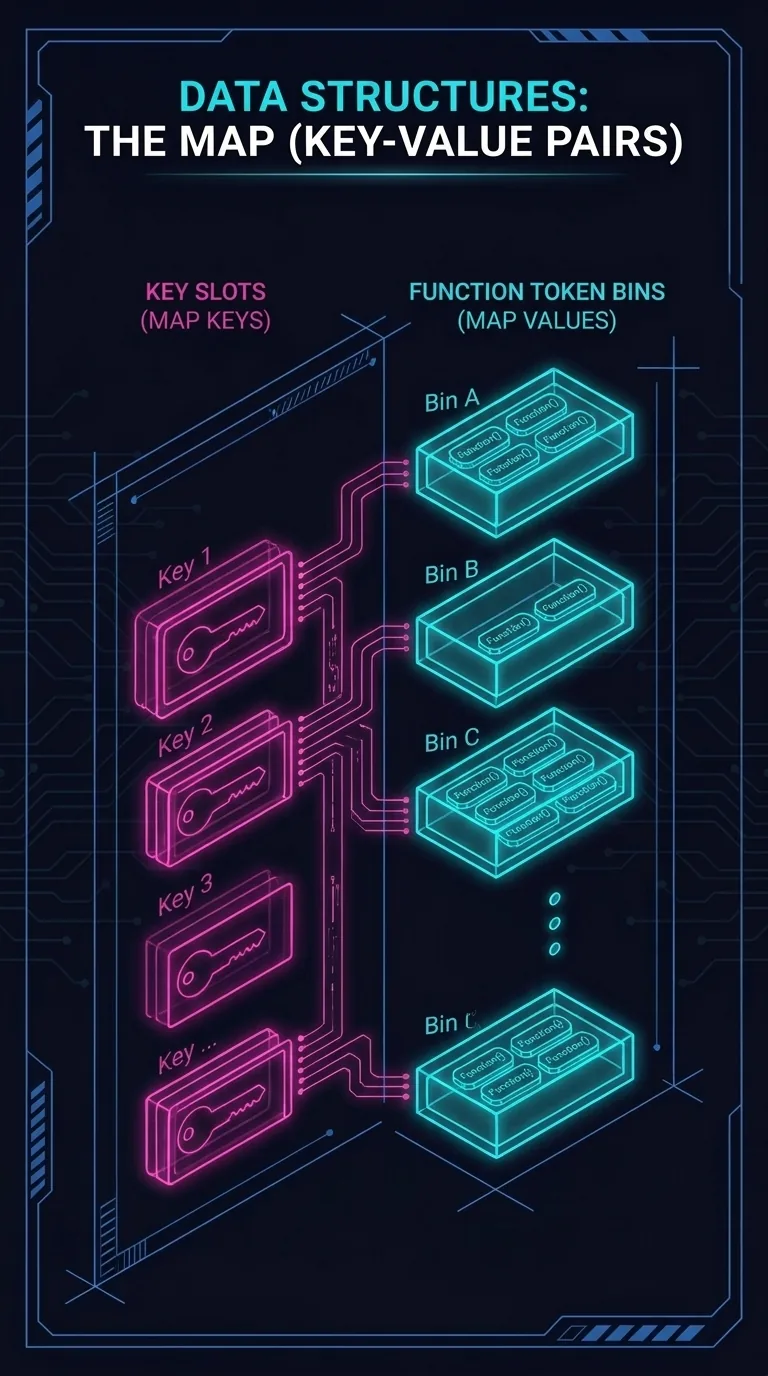
Map<K, V> | "a map from K to V" | A lookup table — two slots, K for keys and V for values |
Map takes two type parameters. A generic can have more than one slot, just like a function can have more than one parameter. So const tags: string[] from an earlier lesson was already a generic. You just did not see the brackets. Now look at the most important line in the real EventBus, where it remembers every subscription.
Read it one generic at a time, from the outside in. It is a Map. Its keys are strings (event names like "score.changed"). Its values are a Set of EventCallbacks (the listeners for that event). One line tells you the shape of the framework's memory: event name → bag of callbacks. The private in front means no other code can reach in and touch that map directly. It stays behind the on and emit methods.
Interfaces: a shape many things can match
Generics let one definition carry many types. Interfaces solve the matching problem: one shape that many objects can promise to match. You already met one. It is the query every SystemCode that runs every frame over the entities matching its query; where game logic lives. declares to say which entities it cares about. (A quick recap from last lesson: an entityA thing in the game (player, bullet, tree) — just an id plus a bag of components, with no behavior of its own. is a thing in the game. Components are the data pieces attached to it. A System runs over the entities that match its query. So a query just filters entities by which components and tags they carry.) Here is the query in full, from the source.
An interface is a contract. It lists the fields a value must have, and their types, to count as that kind of thing. Every field here ends in ?, so each one is optional. A valid ISystemQuery can supply any of them and skip the rest. The [] on each type reads "a list of." A system that wants moving entities writes { required: [Position, Velocity] }. TypeScript checks it against the contract. Misspell required, or pass a single component where a list belongs, and you are caught before the code runs. An interfaceA named contract listing the fields or methods a value must have, with no implementation of its own. holds no logic. It is pure description, and any object that fits is accepted.
One contract, many engines
The framework never talks to a 3D library directly. Instead it defines one interface, the renderer adapterThe single interface that wraps a 3D engine so the framework drives Babylon or Three through one contract.. This interface lists everything a renderer must do. The framework ships two objects that satisfy it: one drives Babylon.js, and one drives Three.js. Before we read the interface, look at a trick it uses to keep engine types from leaking out.
Vec3 and Color are friendly aliases. Both are "three numbers," but the names make a signature read like a sentence. The handles below them are the trick. There is one handle per kind of thing an engine makes. A mesh is a renderable shape. A skybox is the background. The rest are lights, cameras, and such. What each one is does not matter here. The engine hands back a token you cannot peek inside. When an adapter makes a box, it hands back a MeshHandle. The rest of the game holds onto that token but can never look inside it. Its one field is a unique symbol, a type guaranteed to be unlike every other. That makes each handle an opaque, branded typeAn opaque type made distinct by tagging it with a unique marker field, so TypeScript won't mix it up with a lookalike.. At runtime, a MeshHandle is just an ID token. The adapter uses it to look up the real mesh, because it stores a Map from handle to engine object. A MeshHandle differs from a LightHandle only through the phantom brand field. The compiler sees that field, and the runtime ignores it. So TypeScript will not let you pass one where the other belongs. The payoff is that no Babylon mesh or Three mesh ever shows up in framework code. There are only these neutral tokens. The engine's types stay sealed behind the adapter.
Now the contract those handles flow through. Here is the top of the real interface.
RendererAdapter lists what any renderer must supply. It reports a kind. It has an init to start up, which takes an HTMLCanvasElement (the page element a 3D scene draws into). It has a createMesh that returns one of those opaque MeshHandles. And it has dozens more methods below this slice. The Promise<void> on init is itself a generic, and a hint at a topic for later: code that finishes later and hands back nothing. RendererAdapter is a contract, the same as ISystemQuery. It just describes methods instead of fields. Two objects honor it.
| Adapter | Draws with | Honors |
|---|---|---|
BabylonAdapter | Babylon.js | RendererAdapter |
ThreeAdapter | Three.js | RendererAdapter |
Because both honor the same interface, the framework drives the renderer without knowing which one is plugged in. The choice happens once, at startup.
Switching from Babylon to Three is that one line. Nothing else changes. Everything else was only ever typed against the contract, never against a specific engine.
Two kinds of flexibility
Generics and interfaces solve two halves of the same wish. You want a small codebase that bends to data and engines it was never built for. And you want to keep the type checker the whole time.
Generics <T> | Interfaces | |
|---|---|---|
| Flexibility across… | types (any payload) | implementations (any object that fits) |
| In the framework | emit<T>, Map<string, Set<EventCallback>> | ISystemQuery, RendererAdapter |
| What it buys | type-safe code for data it's never seen | swap one piece without touching the rest |
You can now read Map<string, Set<EventCallback>> as an ordinary sentence. You can also see why a swap between rendering engines is a single typed line. That covers the language. The rest of the course turns from correctness to the machine underneath it. The first question is a surprising one: how little can a computer actually do in the tiny slice of time one frame gives it?
Next: What a Computer Can Do in 16 Milliseconds — the surprising truth about how little time a single frame really gives you.