
logo

Babylon.js Market

By Lawrence

9 minutes

Composing Gameplay

TL;DR — You snap KeyboardMover, Movement, Score, Health, and HealthBar onto one hero and a ring of coins. These arcadeThe BabylonJS Market component/game framework that ships a library of ready-made gameplay components. components never import each other. Together they make a playable coin collector. You glue them with one small PickupSystem that only emits and listens on the event bus. New here: separate components work together using only events, while your one system holds the game's rules. This is the composition pattern the rest of the course builds on.

Last lesson ended with a still scene. JSON declared a hero sphere, a ground, and an orbit camera. ArcadeGame booted it, and nothing moved. The scene format could name gameplay components, but it could not make them work together. In this lesson you wire them up. Snap KeyboardMover, Movement, Score, Health, and HealthBar onto one hero and ring it with coins. Now you have a playable coin collector. Seven of these components ship finished. Not one imports another's system, and none of them shares gameplay logic. They share primitives like MeshPrimitive and ArcCamera, never each other's rules. KeyboardMover has never heard of Score. Health does not import HealthBar. Their only shared dependencyAnother piece of code a file imports and relies on to do its job. is the event bus. The single system you write sits outside all of them and talks only through events. Each one announces what happened on the bus, and the others listen. That is how parts built alone can still work together.

The last five lessons taught the basics: write a system, read and emit on the bus, declare a world in JSON, and boot it with ArcadeGame. Now all of that pays off at once. Most of this game is JSON. The one system you write is under a hundred lines and imports nobody.

Component pairOwnsTalks via
KeyboardMoverWASD/arrow input to camera-relativeMovement measured against where the camera looks: W pushes the hero away from the camera, not toward a fixed world direction, so movement matches what the player sees. X/Z motionwrites the mesh position
MovementgravityA constant downward acceleration applied each frame so an entity falls realistically., jump, ground-snapClamping a falling entity to the floor height so it lands cleanly instead of sinking through. - the Y axisreads/writes the mesh position; listens for JUMP_REQUESTED
Scorepoint buckets keyed by ownerscore.add in, score.changed out
ScoreboardDOM HUD rowssubscribes to score.changed
HealthHP, i-framesInvulnerability frames - a short window after taking damage during which further hits are ignored., deathhealth.damage in, health.damaged / health.died out
HealthBarbillboarded world-spacePositioned inside the 3D scene itself, so it moves and scales with the world, unlike a fixed DOM/screen overlay drawn on top of the canvas. HP barreads the hero's Health + mesh
Flashself-deleting hit sparka lifetime timer; its system removes the host

In the "Talks via" column, in means events the component listens for, and out means events it emits. Names like score.add and health.damaged are event names on the bus, not files. (DOM here means the browser's HTML page, where key presses arrive.)
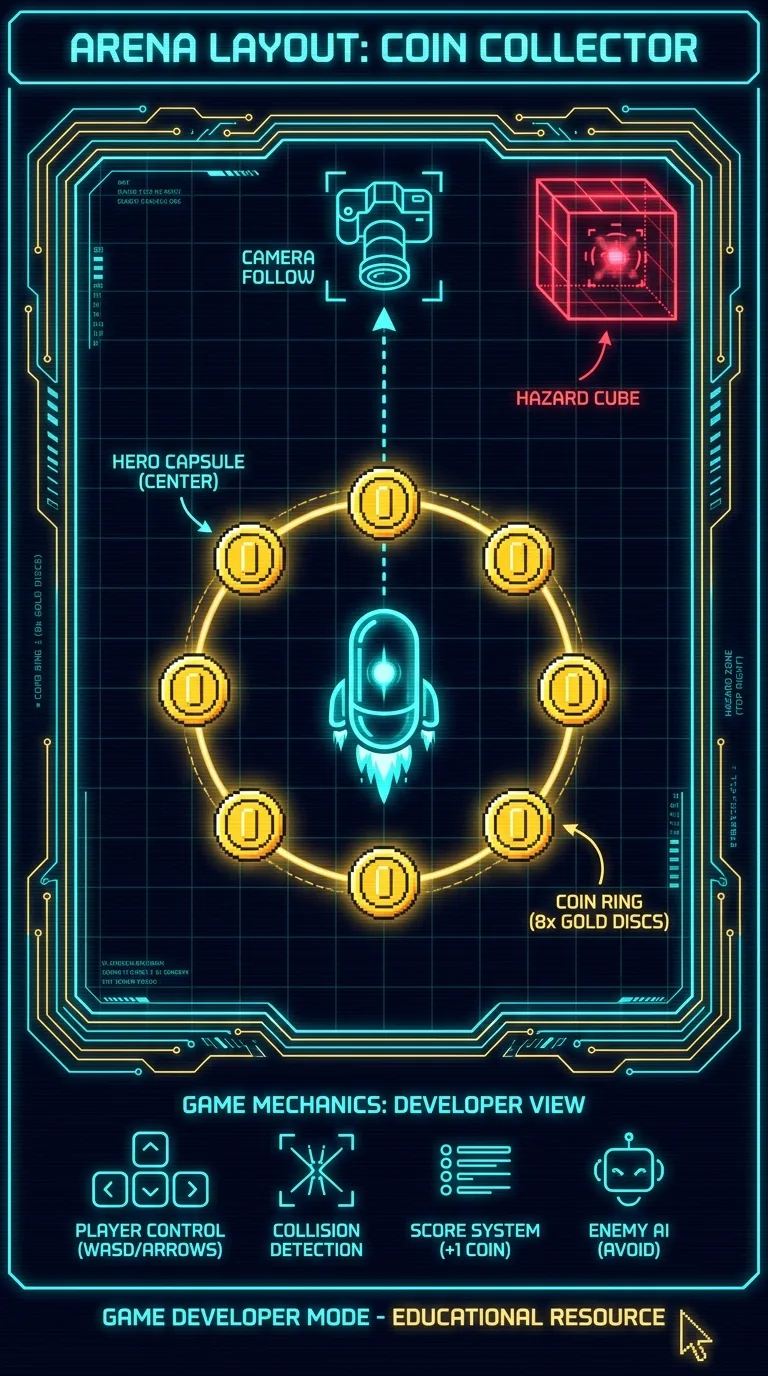
Top-down layout diagram of a coin collector arena: a glowing capsule hero in the center, eight gold coin discs arranged in a ring around it, one red hazard cube pulsing in a corner, a camera icon hovering above with a dotted follow-line to the hero, dark navy background, neon cyan and gold linework, retro arcade schematic style

Declaring the arena in scene JSON

Scenes are data, so the arena is content, not code. The hero stacks four behavior components plus a mesh and a shadow. Each one has a job:

{
  "name": "CoinArena",
  "entities": {
    "Hero": {
      "tags": ["player"],
      "components": {
        "MeshPrimitive": {
          "primitive": "capsule", "height": 2, "radius": 0.5,
          "position": [0, 1, 0],
          "material": { "diffuseColor": [0.25, 0.7, 0.95], "emissiveColor": [0.05, 0.15, 0.25] }
        },
        "Movement": { "groundY": 0, "feetOffset": 1, "faceMotion": false },
        "KeyboardMover": { "speed": 6, "faceMotion": true },
        "Shadow": {},
        "Health": { "hp": 5, "invulnSeconds": 1 },
        "HealthBar": { "offsetY": 1.4 }
      }
    },
    "Camera": {
      "components": {
        "ArcCamera": { "distance": 14, "alpha": -1.2, "beta": 1.1 },
        "CameraFollow": { "target": "Hero", "smoothing": 6, "offsetY": 1.2 }
      }
    },
    "Ground": {
      "components": {
        "MeshPrimitive": { "primitive": "ground", "width": 40, "depth": 40, "color": [0.16, 0.15, 0.2] },
        "Shadow": { "castShadow": false, "receiveShadow": true }
      }
    },
    "Sun": {
      "components": {
        "DirectionalLight": { "direction": [-0.4, -0.6, -0.3], "intensity": 2.0, "shadowEnabled": true }
      }
    }
  }
}

Each of the eight coins is the same: an emissive cylinder and a tagA plain string label attached to an entity that systems can query by, like 'coin' or 'player'.. The hazard is one red box that hurts on contact:

"Coin1": {
  "tags": ["coin"],
  "components": {
    "MeshPrimitive": {
      "primitive": "cylinder", "diameter": 0.7, "height": 0.12,
      "position": [5, 0.4, 0],
      "material": { "diffuseColor": [1, 0.85, 0.2], "emissiveColor": [0.6, 0.45, 0.05] }
    }
  }
},
"Hazard": {
  "tags": ["hazard"],
  "components": {
    "MeshPrimitive": {
      "primitive": "box", "width": 1.6, "height": 1.6, "depth": 1.6,
      "position": [-8, 0.8, -8],
      "material": { "diffuseColor": [0.9, 0.2, 0.15], "emissiveColor": [0.5, 0.05, 0.02] }
    },
    "Shadow": {}
  }
}

The coins carry no behavior components. They have a mesh and a tag, nothing more. The tag is how your system finds them, and the mesh is what the player sees. When the only thing you need to know is "this is a coin," a tag holds all of it. (Writing Coin1 through Coin8 by hand is the clunky part. The next lesson's entity pools make coins spawned at runtime cheap, and this hand-placement goes away.)

Moving the hero: KeyboardMover and Movement

The hero stacks KeyboardMover and Movement together. They never clash because they split the work by axis. In 3D, Y points up, and the floor is the X/Z plane. So moving sideways uses two axes, not one.

KeyboardMoverMovement
AxisX and Z (the ground plane)Y (up/down)
Drivescamera-relative WASD/arrow inputgravity, jump impulse, terminal fall, ground-snap
Each framewrites hero X/Z onto the meshreads the mesh's current Y back in, integrates, writes Y out
Listens forDOM keydown/keyupMovementInputEvents.JUMP_REQUESTED

Here is the real KeyboardMoverSystem. You don't need to read every line of these source slices. The text below each one tells you what it does. Look at what it imports: System, the mesh component, the camera component, and an input-events constant. Now look at what it does not import. There is no MovementComponent and no @babylonjs. It reads which keys are held down. Then it asks the renderer for the camera's forward and right vectors. (A vectorA direction-plus-distance, like an arrow pointing where to move and how far. is just an arrow pointing in some direction.) It flattens those arrows onto the ground, keeping only the X/Z part and dropping up and down. Each frame it moves the mesh a little in that direction. Camera-relative means W pushes the hero away from the camera, not toward a fixed world direction. So the movement matches what the player sees.

A few TypeScript marks show up across these snippets. => is a short function. ! after a value means "trust me, this exists." ?. reads a field but skips it if the thing is missing. : Type labels what kind of value something holds. And await waits for a slow step to finish before moving on.

@babylonjsmarket/arcade/src/Components/KeyboardMover/KeyboardMover.ts
export class KeyboardMoverSystem extends System {
  private forward = 0;
  private back = 0;
  private left = 0;
  private right = 0;
  private currentYaw = 0;
  private _fwdTmp: Vec3 = [0, 0, 0];
  private _rightTmp: Vec3 = [0, 0, 0];
  private keydownHandler: ((e: KeyboardEvent) => void) | null = null;
  private keyupHandler: ((e: KeyboardEvent) => void) | null = null;
  protected query = { required: [KeyboardMoverComponent, MeshPrimitiveComponent] };

  constructor(eventBus: EventBus) {
    super(eventBus);
  }

  protected onInitialize(): void {
    this.listen(KeyboardInputEvents.KEYDOWN, (e: { code: string }) => this.setKey(e.code, 1));
    this.listen(KeyboardInputEvents.KEYUP, (e: { code: string }) => this.setKey(e.code, 0));

    // Bridge DOM keyboard events to the bus so scaffolded projects work
    // out of the box without needing a separate input-source system.
    // Tests skip this branch and emit the bus events directly.
    if (typeof window !== 'undefined') {
      this.keydownHandler = (e: KeyboardEvent) =>
        this.eventBus.emit(KeyboardInputEvents.KEYDOWN, { code: e.code });
      this.keyupHandler = (e: KeyboardEvent) =>
        this.eventBus.emit(KeyboardInputEvents.KEYUP, { code: e.code });
      window.addEventListener('keydown', this.keydownHandler);
      window.addEventListener('keyup', this.keyupHandler);
    }
  }

  protected onShutdown(): void {
    if (typeof window !== 'undefined') {
      if (this.keydownHandler) window.removeEventListener('keydown', this.keydownHandler);
      if (this.keyupHandler) window.removeEventListener('keyup', this.keyupHandler);
    }
    this.keydownHandler = null;
    this.keyupHandler = null;
  }

  private setKey(code: string, value: 0 | 1): void {
    if (FORWARD_KEYS.has(code)) this.forward = value;
    else if (BACK_KEYS.has(code)) this.back = value;
    else if (LEFT_KEYS.has(code)) this.left = value;
    else if (RIGHT_KEYS.has(code)) this.right = value;
  }

  protected onUpdate(dt: number): void {
    const r = this.world?.renderer;
    if (!r) return;

    const inputZ = this.forward - this.back;
    const inputX = this.right - this.left;

    // Camera basis in world space. The adapter bakes in its own handedness —
    // Babylon (left-handed) and Three (right-handed) return oppositely-signed
    // right vectors for the same camera position, so the System doesn't need
    // to know which engine is in play.
    const cam = this.findArcCameraHandle();
    if (cam) {
      r.getCameraForward(cam, this._fwdTmp);
      r.getCameraRight(cam, this._rightTmp);
    } else {
      this._fwdTmp[0] = -1; this._fwdTmp[1] = 0; this._fwdTmp[2] = 0;
      this._rightTmp[0] = 0; this._rightTmp[1] = 0; this._rightTmp[2] = -1;
    }

    // Project to the XZ plane (ignore Y so a tilted camera still walks flat)
    // and re-normalize.
    let fwdX = this._fwdTmp[0], fwdZ = this._fwdTmp[2];
    let rightX = this._rightTmp[0], rightZ = this._rightTmp[2];
    const fLen = Math.hypot(fwdX, fwdZ);
    if (fLen > 1e-6) { fwdX /= fLen; fwdZ /= fLen; }
    const rLen = Math.hypot(rightX, rightZ);
    if (rLen > 1e-6) { rightX /= rLen; rightZ /= rLen; }

    let vx = fwdX * inputZ + rightX * inputX;
    let vz = fwdZ * inputZ + rightZ * inputX;
    const len = Math.hypot(vx, vz);
    if (len > 1) {
      vx /= len;
      vz /= len;
    }

    for (const entity of this.entities) {
      const mover = entity.get(KeyboardMoverComponent);
      const mesh = entity.get(MeshPrimitiveComponent);
      if (!mover || !mesh?.handle) continue;

      if (vx !== 0 || vz !== 0) {
        mesh.position[0] += vx * mover.speed * dt;
        mesh.position[2] += vz * mover.speed * dt;
        r.setMeshPosition(mesh.handle, mesh.position[0], mesh.position[1], mesh.position[2]);

        if (mover.faceMotion) {
          this.currentYaw = Math.atan2(vx, vz);
          mesh.rotation[1] = this.currentYaw;
          r.setMeshRotation(mesh.handle, 0, this.currentYaw, 0);
        }
      }
    }
  }

  private findArcCameraHandle(): CameraHandle | undefined {
    if (!this.world) return undefined;
    for (const entity of this.world.getEntities()) {
      const arc = entity.get(ArcCameraComponent);
      if (arc?.handle) return arc.handle;
    }
    return undefined;
  }
}

Splitting the work onto X and Z is the whole idea. (Normalizing those vectors keeps movement the same speed in every direction, even diagonals. The two engines disagree on coordinate-system handedness, which is which way "right" points, and the adapterThe piece that lets the same component run on either Babylon or Three by hiding each engine's differences behind one interface. hides that.) KeyboardMover writes mesh.position[0] and mesh.position[2] and never touches [1]. Movement owns [1]. Each frame MovementSystem reads the mesh's current Y back in, applies gravity, clamps to the ground, and writes Y out. Neither imports the other. They both share one mesh position, but they write different slots of it. So both can read and edit it in the same frame without getting in each other's way.
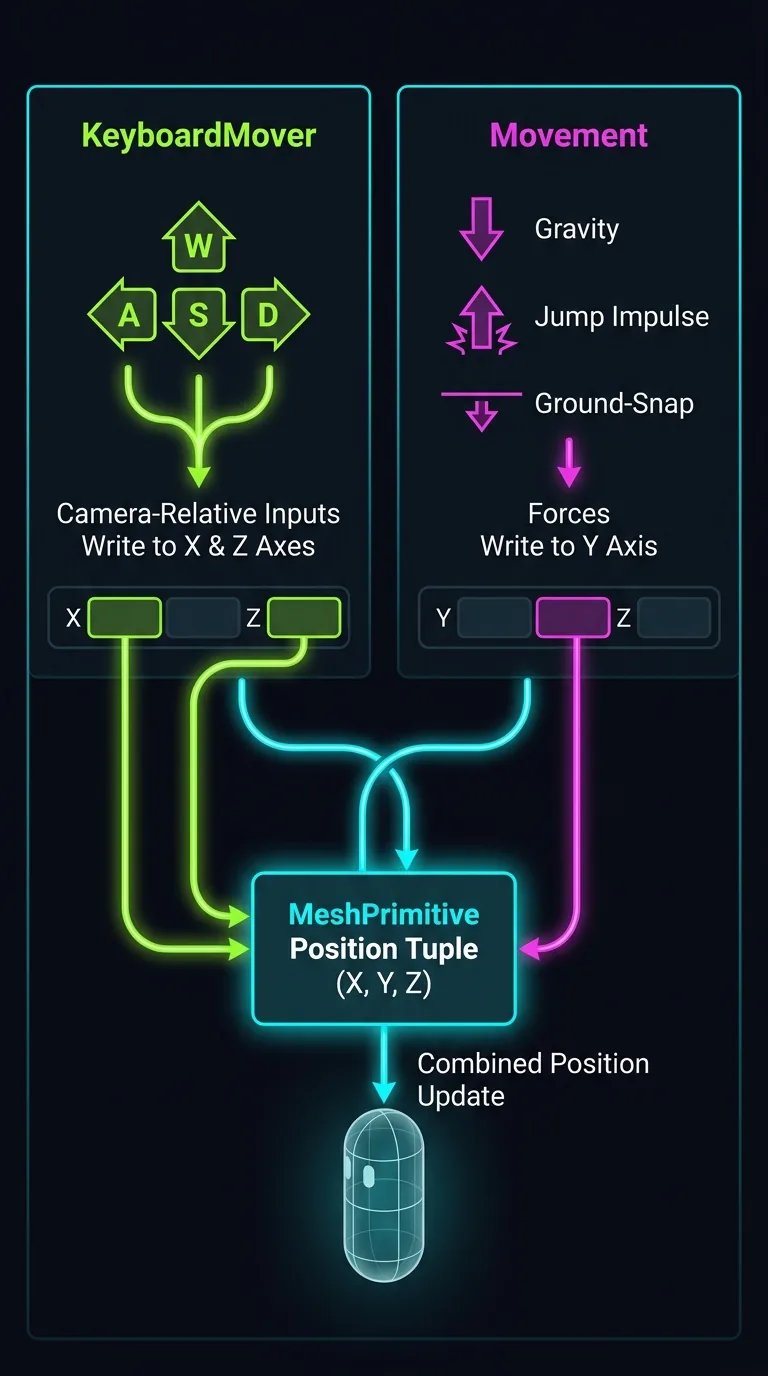
Split-panel diagram showing division of labor over a 3D capsule character: left panel labeled KeyboardMover with camera-relative WASD arrows writing to the X and Z axes of a mesh position block, right panel labeled Movement with gravity arrows, a jump impulse, and ground-snap line writing to the Y axis of the same mesh position block, both panels converging on one shared MeshPrimitive position tuple in the center, dark background, neon green and magenta accents

Movement also listens on the bus. Emit MovementInputEvents.JUMP_REQUESTED and the hero jumps. This is how an AI or a UI button makes the hero jump, using only the hero entity's id. (bus here is the EventBusThe central messaging channel where systems emit and listen for events instead of calling each other directly., which you can reach anywhere as game.world.getEventBus().)

import { MovementInputEvents } from '@babylonjsmarket/arcade';

bus.emit(MovementInputEvents.JUMP_REQUESTED, { entityId: 'Hero' });

Both components carry a faceMotion flag, because each one can run on its own. When you stack them, you want exactly one of them to set the yawRotation around the vertical axis - which compass direction the character faces., which is the compass direction the hero faces. So the scene sets faceMotion: false on Movement and true on KeyboardMover. ArcCamera creates the orbit camera, one that circles a point in space. CameraFollow re-aims it at whatever entity id you name (smoothing: 6 feels natural, 12 snaps tight). The look point is what the camera aims at. We leave ArcCamera's target unset so CameraFollow is the only thing that writes it, the same one-writer rule as the yaw.

Scoring with the Score and Scoreboard components

Score is data only. It holds buckets of points keyed by owner, and it works through events. It does no per-frame work. Every change arrives as an event and leaves as one. Here is the real system, and the empty body of onUpdate shows it:

@babylonjsmarket/arcade/src/Components/Score/Score.ts
export class ScoreSystem extends System {
  protected query = { required: [ScoreComponent] };

  constructor(eventBus: EventBus) {
    super(eventBus);
  }

  protected onInitialize(): void {
    this.listen(ScoreInputEvents.ADD, (e: ScoreAddRequest) => this.handleAdd(e));
    this.listen(ScoreInputEvents.RESET, () => this.handleReset());
    this.listen(ScoreInputEvents.GOAL_SCORED, (e: GoalScoredPayload) =>
      this.handleGoalScored(e),
    );

    for (const entity of this.entities) this.ensureInstance(entity);
  }

  protected onEntityAdded(entity: Entity): void {
    this.ensureInstance(entity);
  }

  private ensureInstance(entity: Entity): void {
    const comp = entity.get(ScoreComponent);
    if (!comp || comp.instance) return;
    comp.instance = createScore(comp.params, comp.initialScores);
  }

  /** The single scoreboard entity (first match wins). */
  private getPrimary(): ScoreComponent | null {
    for (const entity of this.entities) {
      const comp = entity.get(ScoreComponent);
      if (comp?.instance) return comp;
    }
    return null;
  }

  private handleAdd(e: ScoreAddRequest): void {
    if (!e?.ownerEntity) return;
    const comp = this.getPrimary();
    if (!comp?.instance) return;

    const result = comp.instance.addScore(e.ownerEntity, e.points);
    this.eventBus.emit(ScoreEvents.CHANGED, {
      ownerEntity: result.ownerEntity,
      score: result.to,
      delta: result.delta,
      allScores: comp.instance.getAllScores(),
    });
  }

  private handleGoalScored(e: GoalScoredPayload): void {
    if (!e?.ownerEntity) return;
    this.handleAdd({ ownerEntity: e.ownerEntity, points: e.points });
  }

  private handleReset(): void {
    const comp = this.getPrimary();
    if (!comp?.instance) return;
    comp.instance.resetScores();
    this.eventBus.emit(ScoreEvents.RESET, {
      allScores: comp.instance.getAllScores(),
    });
  }

  protected onUpdate(_dt: number): void {
    // Score has no per-frame work — everything is event-driven.
  }
}

handleAdd is the whole loop. A score.add comes in carrying an ownerEntity. The bucket for that owner gains points. Then a score.changed goes out carrying the new total. The owner keyThe entity id a score bucket is keyed by, matching the ownerEntity field carried in score events. is the id that ties a score event to the right bucket. Every score event names the entity whose bucket changed. Score also listens to goal.scored, so any scene built around the Goal mechanic feeds the scoreboard with no extra code. Import these names from @babylonjsmarket/arcade (ScoreInputEvents.ADD, ScoreEvents.CHANGED) instead of typing the strings. A misspelled event name does not throw an error. It just never fires.

Scoreboard is a DOM overlayRegular HTML drawn on top of the 3D canvas, used here for the score HUD and win/lose screens.. It subscribes to ScoreEvents.CHANGED and redraws one row per player. Both live on a HUD entity:

"HUD": {
  "components": {
    "Score": { "defaultPoints": 1 },
    "Scoreboard": {
      "title": "COINS",
      "position": "top-right",
      "players": [{ "entityId": "Hero", "name": "Hero", "color": [0.35, 0.9, 1] }]
    }
  }
}

The roster's entityId matches the ownerEntity in score events. It is the same owner key on both ends.

Taking damage: the Health, HealthBar, and Flash components

Health follows the same shape. It is pure state, event-driven, with no per-frame work. Anything that hurts the hero emits HealthInputEvents.DAMAGE. The system ignores hits during the invulnerability window. It emits HealthEvents.DAMAGED when HP actually changes, and it emits HealthEvents.DIED the frame HP hits zero:

@babylonjsmarket/arcade/src/Components/Health/Health.ts
export class HealthSystem extends System {
  protected query = { required: [HealthComponent] }

  constructor(eventBus: EventBus) {
    super(eventBus)
  }

  protected onInitialize(): void {
    this.listen(HealthInputEvents.DAMAGE, (req: HealthDamageRequest) => {
      this.applyDamage(req)
    })
    this.listen(HealthInputEvents.HEAL, (req: HealthHealRequest) => {
      this.applyHeal(req)
    })
  }

  protected onUpdate(_dt: number): void {
    /* event-driven */
  }

  private applyDamage(req: HealthDamageRequest): void {
    const ent = this.world?.getEntity(req.entityId)
    if (!ent) return
    const h = ent.get(HealthComponent)
    if (!h || h.hp <= 0 || req.damage <= 0) return
    const now = typeof performance !== 'undefined' ? performance.now() : Date.now()
    if (now < h.invulnUntil) return

    h.hp = Math.max(0, h.hp - req.damage)
    if (h.invulnSeconds > 0) h.invulnUntil = now + h.invulnSeconds * 1000
    this.eventBus.emit(HealthEvents.DAMAGED, {
      entityId: req.entityId,
      hp: h.hp,
      maxHp: h.maxHp,
      damage: req.damage,
    })

    if (h.hp <= 0) {
      this.eventBus.emit(HealthEvents.DIED, { entityId: req.entityId })
      if (h.respawnPosition) this.respawn(ent, h)
    }
  }

The if (now < h.invulnUntil) return line does real design work. The hazard check (coming up next) fires every frame the hero overlaps the red block. The update loop runs about sixty times a second, so that would be sixty damage events a second. This one comparison ignores all but the first hit. Then it sets invulnUntil one second into the future. That cuts a flood of overlap events down to one hit per second. You never wrote that limit into the hazard code. You set invulnSeconds: 1 in the scene JSON, and Health enforces it for any source of damage.

HealthBar is the world-space readout. It is a billboarded bar that lives in the 3D scene above the mesh. It drains as HP drops and hides at full health. Unlike the bus-driven components, it does not subscribe to anything. Each frame it reads the host's Health.hp and maxHp directly and resizes itself. Not every component listens to events. Some just check the value each frame. Flash is the smallest mechanic in the library: one lifetime field whose system deletes the host entity when the timer runs out. Pair it with a bright sphere mesh and you get a hit spark that removes itself.

The one system you write: PickupSystem

Everything so far was declared in JSON. Nothing yet knows that touching a coin should score, or that the hazard should hurt. That rule is your game, and it lives in your system. The system reads positions and emits events, and it imports none of the seven components' systems:

import { System } from '@babylonjsmarket/ecs';
import {
  MeshPrimitiveComponent,
  FlashComponent,
  ScoreInputEvents,
  HealthInputEvents,
  HealthEvents,
} from '@babylonjsmarket/arcade';

const PICKUP_RADIUS = 1.2;
const HAZARD_RADIUS = 1.5;

export class PickupSystem extends System {
  // The query hands us live coins. The player and hazards we find by tag.
  protected query = { required: [MeshPrimitiveComponent], tags: ['coin'] };

  protected onInitialize(): void {
    // Spark on real damage only — Health already filtered out i-frame hits.
    // listen() auto-disposes the subscription when the system is removed.
    this.listen(HealthEvents.DAMAGED, (e: { entityId: string }) => {
      const victim = this.world?.getEntity(e.entityId);
      const mesh = victim?.get(MeshPrimitiveComponent);
      if (mesh) this.spawnFlash(mesh.position[0], mesh.position[1], mesh.position[2]);
    });
  }

  protected onUpdate(): void {
    if (!this.world) return;
    const player = this.world.getEntitiesByTag('player').find((e) => e.active);
    const playerMesh = player?.get(MeshPrimitiveComponent);
    if (!player || !playerMesh) return;
    const [px, , pz] = playerMesh.position;

    // Coins: close enough means collected.
    for (const coin of this.entities) {
      const mesh = coin.get(MeshPrimitiveComponent)!;
      if (dist2(px, pz, mesh.position) < PICKUP_RADIUS * PICKUP_RADIUS) {
        this.eventBus.emit(ScoreInputEvents.ADD, { ownerEntity: player.id });
        this.world.removeEntity(coin.id); // gone — and next lesson this exact line becomes pool recycling
      }
    }

    // Hazards: spam damage freely; Health's i-frames meter it to one tick a second.
    for (const hazard of this.world.getEntitiesByTag('hazard').filter((e) => e.active)) {
      const mesh = hazard.get(MeshPrimitiveComponent);
      if (mesh && dist2(px, pz, mesh.position) < HAZARD_RADIUS * HAZARD_RADIUS) {
        this.eventBus.emit(HealthInputEvents.DAMAGE, { entityId: player.id, damage: 1 });
      }
    }
  }

  private spawnFlash(x: number, y: number, z: number): void {
    const e = this.world!.createEntity();
    e.add(new MeshPrimitiveComponent({
      primitive: 'sphere', diameter: 1.4, segments: 8,
      position: [x, y, z],
      material: { diffuseColor: [1, 0.3, 0.2], emissiveColor: [1, 0.3, 0.2] },
    }));
    e.add(new FlashComponent({ lifetime: 0.08 })); // FlashSystem deletes it for us
  }
}

function dist2(px: number, pz: number, p: number[] | readonly number[]): number {
  const dx = px - p[0], dz = pz - p[2];
  return dx * dx + dz * dz;
}

const [px, , pz] = playerMesh.position pulls the X and Z out of the position and skips Y. The empty slot between the commas is the height, and we ignore it, because dist2 measures distance on the floor plane only. A coin counts as collected when the hero is over it, no matter the heights. The queryThe filter a system declares so the framework hands it only the entities it cares about. asks for both a component and a tag, so this.entities holds only the coins. The framework filters them for you, and you never write if (isCoin). The player and hazard come from getEntitiesByTag, which still returns inactive entities, so those lookups filter on e.active. Removing the current coin inside the loop is safe here. Deleting the element you are standing on during a for...of won't skip the next one. Still, the library's own Flash plays it safer: it collects ids and removes them after the loop. (Setting coin.active = false instead of removing it would soft-remove the coin. It gets pulled from every query and its mesh is hidden, but nothing is destroyed. The next lesson shows that flag is the mechanism behind entity pooling.) The flash spawns from the HealthEvents.DAMAGED handler, so it fires once per real hit, never on the absorbed i-frame ones.

Booting it is the Scenes as Data recipe plus exactly one line:

const game = new ArcadeGame(new BabylonAdapter());
await game.init(canvas);
await game.loadSceneFromUrl('/scenes/coin-arena.json');
game.world.addSystem(new PickupSystem(game.world.getEventBus()));
game.start();

BabylonAdapter is the adapter that runs the world on Babylon. canvas is the HTML element it draws into. That addSystem call is the only behavior the JSON didn't carry. Trace one coin pickup below. Every arrow is an event on the bus, never a direct call between systems:

EmitterEventWho reacts
PickupSystem (yours)score.addScoreSystem
ScoreSystemscore.changedScoreboardSystem, your DOM win check
PickupSystem (yours)health.damageHealthSystem
HealthSystemhealth.damagedPickupSystem (spawns the spark)
HealthSystemhealth.diedyour DOM game-over overlay

PickupSystem sits on both sides. It emits health.damage and reacts to the health.damaged that comes back. It never calls HealthSystem directly. It lets the bus carry the message both ways.
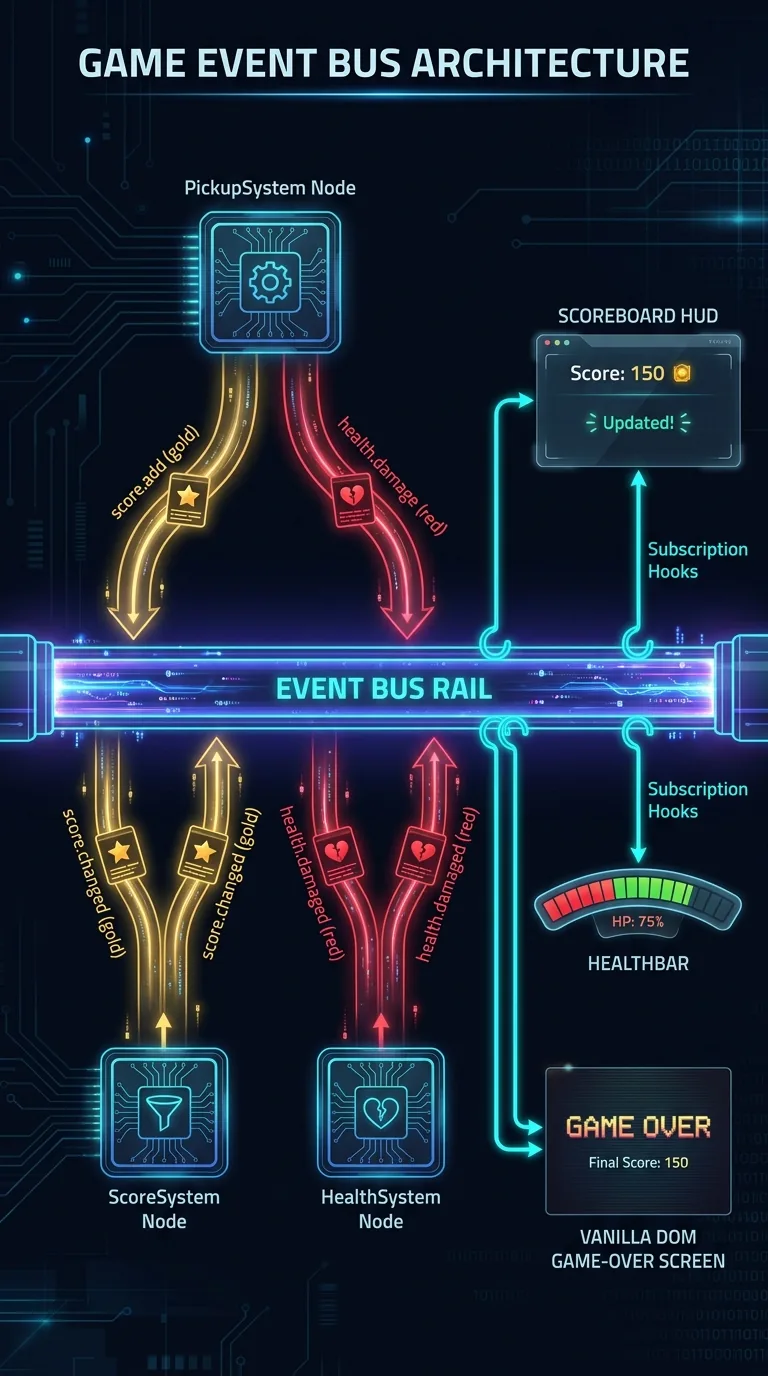
Event flow diagram on a dark background: a horizontal glowing event bus rail in the center; above it a custom PickupSystem node emitting score.add and health.damage event packets onto the rail; below it ScoreSystem and HealthSystem nodes consuming those packets and re-emitting score.changed and health.damaged packets back onto the rail; on the far right a Scoreboard HUD panel and a vanilla DOM game-over screen each tapping the rail with subscription hooks, while a floating HealthBar sits apart reading the hero's Health directly each frame rather than from the rail; neon cyan, gold, and red packet trails, circuit-board aesthetic

Win and lose screens from plain DOM

Win and lose conditions don't have to live inside the world. world.getEventBus() returns the same bus every system uses. So a plain DOM overlay follows the same rules a system does: subscribe, emit, follow the contract:

import { ScoreEvents, HealthEvents, ScoreInputEvents } from '@babylonjsmarket/arcade';

const bus = game.world.getEventBus();

const coinsEl = document.querySelector('#coin-count')!;
bus.on(ScoreEvents.CHANGED, (e: { ownerEntity: string; score: number }) => {
  if (e.ownerEntity === 'Hero') coinsEl.textContent = `${e.score} / 8`;
});

bus.on(HealthEvents.DIED, (e: { entityId: string }) => {
  if (e.entityId !== 'Hero') return;
  document.querySelector('#game-over')!.classList.remove('hidden');
  game.stop();
});

// The retry button is just another event emitter.
document.querySelector('#retry')!.addEventListener('click', () => {
  bus.emit(ScoreInputEvents.RESET, {});
  // ...reset positions, hide the overlay, game.start() again
});

From the world's point of view, that game-over screen looks like any other system. The win check is one more if inside a handler, and the retry button is one more emitter. (Note the bus.on here, not this.listen. listen is the System-only wrapper that cleans up on its own. Outside a system you use bus.on and handle the unsubscribe yourself.)

You used seven library components you didn't write and an event vocabulary you didn't invent. You wrote one small system that carries only your game's rules. The library gives you the parts, and you build the game.

Two rough edges remain, and the next lesson covers both: those eight hand-placed coins, and a hit-flash that creates and destroys an entity on every hit. This is fine when hits are rare. It becomes a problem when it means two hundred bullets a second.

Next: Pools and Spawners — stop paying the create and destroy cost on everything you spawn at runtime, using the World's built-in entity pools and the spawner components that feed them.

Was this page helpful?

We read every note — tell us what's working and what isn't.

↑↓ NavigateEnter SelectEsc CloseCtrl+K Open Search