
9 minutes
Scenes as Data
TL;DR — Write a whole level as JSONA plain-text format for structured data using braces and key-value pairs; here it describes a whole scene.: its entities, components, and starting values. Then boot it with
ArcadeGamein four lines, instead of hand-wiringcreateEntitycalls in TypeScript. The sceneA described world — its lights, camera, and objects — that the framework loads and renders; here written as a JSON file. is now content the framework reads, not code you compile. The bundle ships only the components a scene names. The rest of the course builds levels this way.
Last lesson, your systems stopped importing each other. They announce and request through the EventBus. They never hold a reference to whoever is listening. That freed the systems from each other. But the world you build around them is still hand-written TypeScript. For four lessons you built every world the same hard way. You wrote new World(), addSystem, createEntity, and entity.add, one call at a time. That taught you what a world is made of, but it locks your whole level into code. It breaks the moment you want a second level. A level designer can't touch it without recompiling. (Recompiling means rerunning the build that turns code into something the browser runs.)
Pac-Man shipped 256 levels. Nobody wrote 256 functions full of createEntity. The maze walls, the dot positions, the fruit schedule were all data. One copy of the code read that data. When the designers wanted a fresh maze for Ms. Pac-Man, nobody recompiled the ghost AI. Your components and systems are code. Your scenes should be content: a file anyone can diff (compare its versions), generate, share, or sell.
So what turns a JSON file into a live world? And why does a scene that never names Flipper never ship the flipper code at all?
Four lines to a running game
The @babylonjsmarket/arcade package ships ArcadeGame. This class turns scene JSON into a running world. The whole bootstrapThe small block of startup code that wires everything together and launches the app. is four lines. Two words show up in almost every block below. await means wait for this line to finish before the next one runs. canvas is the area on the web page Babylon draws into. It is an HTML <canvas> element you grab once.
Everything you hand-wired in the first four lessons still happens. The JSON drives it now:
new ArcadeGame(new BabylonAdapter())builds aWorld, anEventBus, and aSceneLoaderinside. Hand it the Three adapter instead, and the same JSON renders in Three.js. The last lesson shows how.game.init(canvas, { clearColor })starts the rendererThe layer that draws the 3D scene to the screen each frame; here Babylon.js behind the adapter. on your canvas.clearColoris a renderer option. It is the[r, g, b, a]background the screen clears to each frame. You pass it here at init, not in the scene JSON.game.loadSceneFromUrl('/scenes/playground.json')fetches the JSON. It imports and registers the components the scene names, then builds every entity. (A plainloadScene(sceneData)takes a scene object you already hold in memory.)game.start()runs the render loop. It callsworld.update(dt)every frame.game.stop()halts it.
ArcadeGame exposes game.world and game.eventBus as public properties, so nothing from before is closed off. You can still create entities, subscribe to events, and add systems by hand. The JSON layer is a convenience, and it doesn't lock anything away.
The structure of a scene file
The scene format is an interface in the ECS source, called SceneData. The JSON you write follows this shape. (In the types, a ? means the field is optional. : string and : number name the kind of value it holds.)
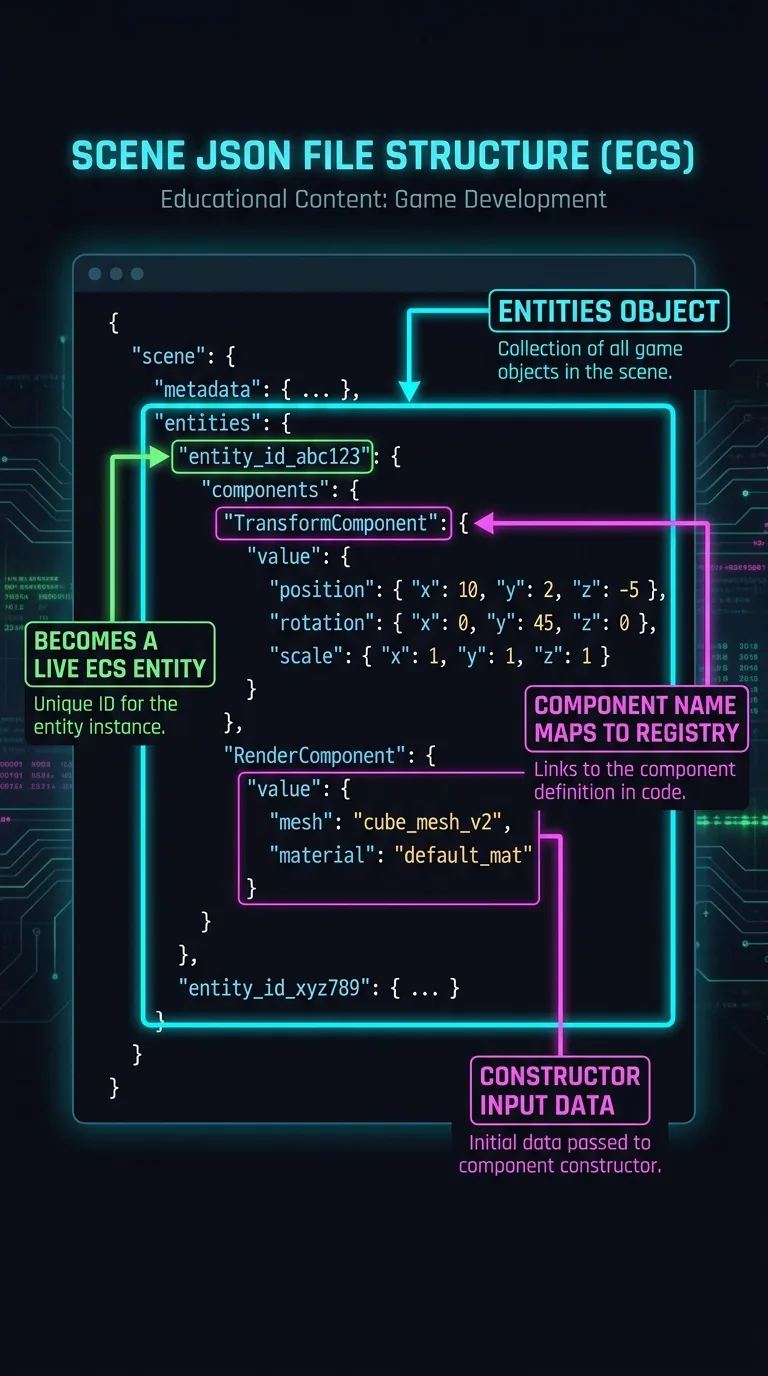
The two fields that carry a whole scene are name and entities. Here is a playground scene. It has a sky that tracks the sun, a ground plane that receives shadows, a hero sphere that casts a shadow, and an orbit camera that frames them all. Every color is an [r, g, b] array of floats from 0 to 1, with an optional 4th alpha. These are not the 0–255 or hex values a web page uses:
entities is keyed by name, not by an array. (An array is a plain ordered list.) This lets the scene refer to things by name, with no hard pointer. (A hard pointer is a direct link to another object.) ArcCamera's "target": "Hero" names the Hero key. Sun is tagged "sun", so the Skybox's followLight: "sun" finds it. This is the same decoupling from Events, Not References, now written as data.
The Sun is a DirectionalLight. This is a light with parallel rays, like the sun. You aim it with a direction vector instead of placing it at a position. The Camera's ArcCamera orbits the Hero. alpha is the horizontal orbit angle and beta is the vertical one. Both are in radians, at the given distance.
Each value under components is that component's input data. Ground and Hero split the shadow work. The ground receives shadows but doesn't cast them. The hero casts a shadow but doesn't receive one. They use the same two components, just with opposite numbers. Shadows in 3D are computed per light. So each object opts in to casting, receiving, or both. The behavior lives in the components. The difference is all in the JSON.
A component value is a constructor argument
That "MeshPrimitive": { "primitive": "sphere", "diameter": 2, ... } block isn't a special scene language. It is the exact object the component's constructorThe setup code that builds a component from the input values — its arguments — you hand it. takes. (The constructor is the setup code that builds the component from the values you hand it. Those values are its arguments.) MeshPrimitive declares its accepted input as an interface. Every key you can write in the JSON is a field on it. (Again, ? marks an optional field, and : number names the kind of value.)
A sphere reads diameter and segments, and ignores width. A ground reads width and depth. The scene loader hands the JSON object straight to new MeshPrimitiveComponent(input). The component then picks the fields its primitive needs. Writing a scene file is calling these constructors. You just spell the arguments in JSON instead of TypeScript.
What loadScene actually does
ArcadeGame is thin. It owns a World, an EventBus, and a SceneLoader. The interesting part is the lazy component registryA lookup table mapping a component's name to the code that loads it.: a map from component names to dynamic imports. Here is the head of the real one. (Each () => import(...) is a small inline function, written with the => arrow. It does nothing until you call it.)
Each value is a function that returns a promiseA value that isn't ready yet but arrives later; code can await it to use the value once it lands. of the module. Nothing loads until the function is called. loadScene is what calls them. The first three lines hold the whole loading idea. Everything below the comment is internal bookkeeping about order. You can skim that part on a first read:
Here is what those three lines do. collectComponentNames walks the JSON and gathers the names used. The playground scene names five: Skybox, DirectionalLight, MeshPrimitive, Shadow, and ArcCamera. The Promise.all calls each name's resolverA function the registry stores that, when called, loads and returns a component's module., so those five modules download at the same time. Each module exports a {Name}Component and usually a {Name}System. The SceneLoader registers both. The naming convention matters here, because the loader finds the exports by string. The two instantiateScene calls run systems first, then entities. So a one-shot event a system emits as an entity is created reaches every other system that needs it.
The payoff is in line three. A bundlerA build tool (Vite, Rollup, esbuild) that combines your modules into the files a browser downloads. turns each import() into its own chunkOne of the separate files a bundler produces when it splits your code.. That chunk downloads only when its resolver runs. So your shipped bundle carries only the components your scenes name. If no scene names Flipper, the flipper code never ships. You get per-component code splittingBreaking a bundle into separate files that download only when the code in them is actually needed., with no bundler configuration to write.
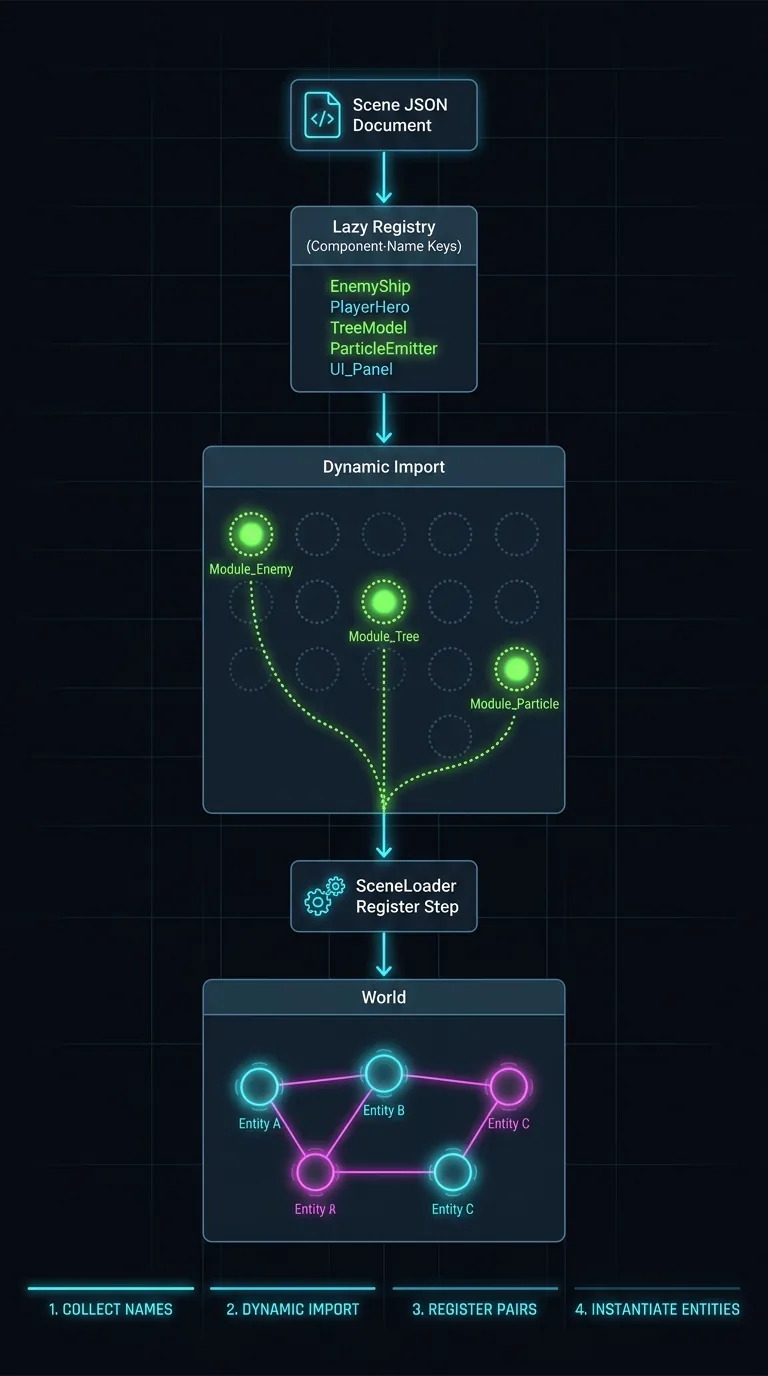
One failure mode is worth knowing now. Name a component the registry doesn't have, and ArcadeGame warns and skips it. The scene still loads, but that entity is missing a part. Watch the console when a mesh you expected doesn't appear.
The built-in arcade component library
Naming components in JSON only pays off if there are components worth naming. The arcade registry maps about forty of them. Knowing what already exists lets you use it instead of rebuilding it:
| Group | Components |
|---|---|
| Rendering | MeshPrimitive (boxes, spheres, capsules, grounds), Mesh (load .glb/.gltf), Shadow, Skybox, EnvironmentTexture, DirectionalLight, HemisphericLight |
| Input | KeyboardMover (W/A/S/D movement keys, working out of the box), PlayerInput (mapped actions), TwinStickShooter |
| Movement & physics | Movement (velocity-driven), Physics (rigid bodies — collidable solid objects) |
| Cameras | ArcCamera (orbit a target), CameraFollow (track with lag), PinballCamera, ShooterCamera |
| Gameplay | Score, Scoreboard (DOM overlay), Health, HealthBar, Flash (hit feedback) |
| Animation | Animation, SkeletonAnimator |
| Pooling & shooter | EntityPool, BulletPool, Bullet, Enemy, EnemySpawner |
| Pinball | PinballTable, Flipper, Plunger, Bumper, Spinner, MouseHole |
Add a KeyboardMover next to a MeshPrimitive, and the mesh drives with arrow keys. EnemySpawner plus EntityPool gives you the backbone of a wave shooter. Flipper, Plunger, and Bumper combine into a working pinball table.
Every one follows the convention you've used since Lesson 2. {Name}Component holds data. {Name}System holds logic. {Name}Events names what it emits. {Name}InputEvents names what it listens to. The library isn't a different kind of code from yours. It is yours, published.
Registering your own components
To use the Spin component you wrote earlier in scene JSON, register a resolver. Do it in the constructor:
Or after construction:
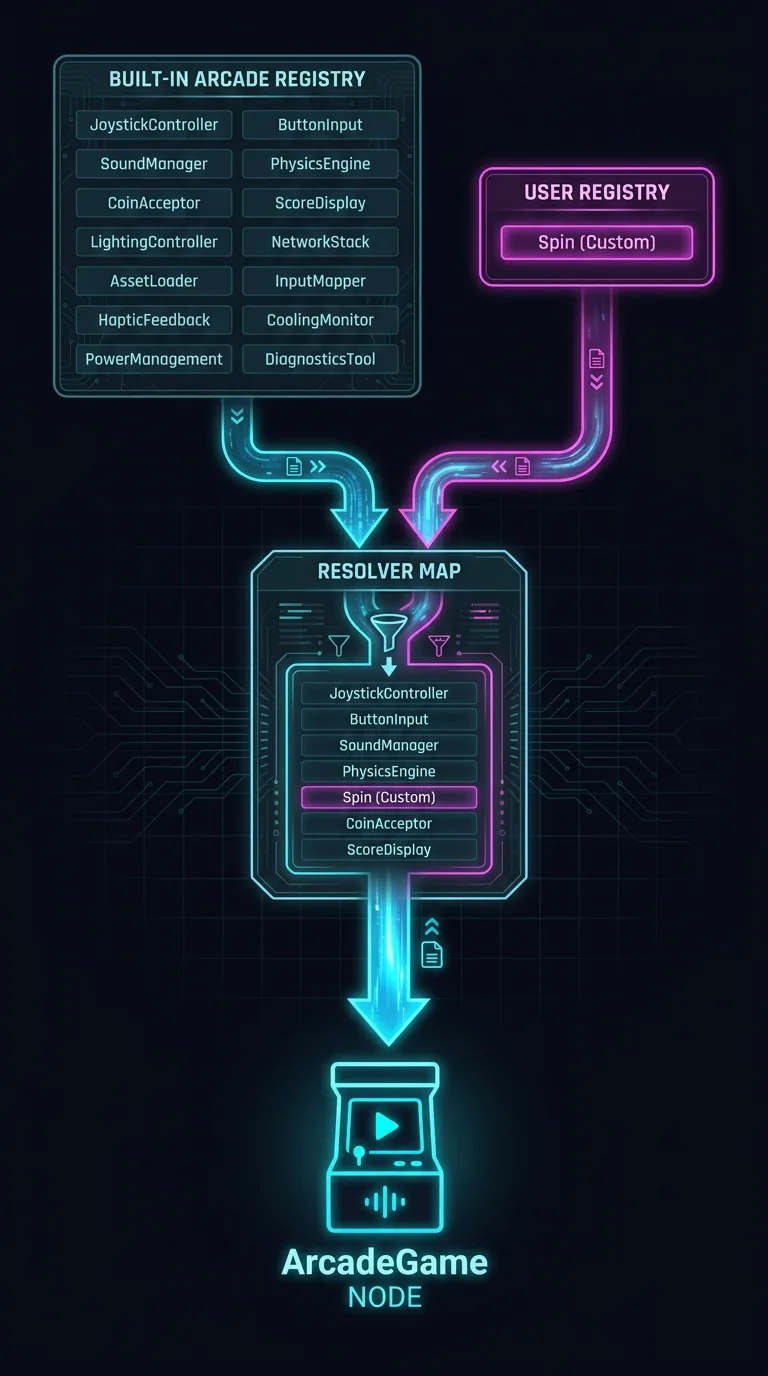
The contract is the naming convention. Your ./components/Spin module must export SpinComponent. If it has behavior, export a SpinSystem too. The system is added to the world once during scene load, before its entities are created. Do that, and this works in any scene file:
Your component now sits in the JSON next to the built-ins, and looks just like them. Custom resolvers merge over the built-in registry. So registering an existing name overrides the stock component. You can change KeyboardMover's behavior without forking the package. Here is how a name resolves:
| Name in JSON | In built-in registry? | In your registry? | What loads |
|---|---|---|---|
MeshPrimitive | yes | no | the arcade built-in |
Spin | no | yes | your module |
KeyboardMover | yes | yes | yours — custom overrides the built-in |
Wobble | no | no | nothing; ArcadeGame warns and skips it |
Your turn: edit the scene
In a Vite project, public/ is the folder of static files served as-is at the site root. Save the playground JSON there as public/scenes/playground.json. Point loadSceneFromUrl at /scenes/playground.json. (The leading / is that root.) Then make three edits:
- Reshape the hero. Change its
MeshPrimitiveto"primitive": "capsule"with a"height": 2, and dropdiameterandsegments. No import changed.MeshPrimitivewas already in the bundle, andcapsulejust reads different fields off the same input interface. - Add a rim light. Create an entity
Rimwith aDirectionalLightpointing oppositeSun. Use"direction": [0.45, -0.25, 0.35], a low"intensity": 0.6, a cool"diffuse": [0.4, 0.5, 1.0], and leaveshadowEnabledoff. A rim light hits the subject from behind. It traces the edges and lifts the subject off the background. This is classic key-and-rim lighting, in pure data. - Retint the sky. The
Skyboxgradient runszenithColoroverhead,horizonColorat the sun line, andgroundColorbelow. PushhorizonColortoward[0.9, 0.3, 0.5]for a magenta sunset. RaisesunGlowSizeto make the sun's disk bloom.
Save and reload after each edit. Every edit changed data, not code. The world rebuilds from the new JSON, while the systems and components stay exactly as they were.
Notice what the scene doesn't declare: no KeyboardMover, no Movement, no Score. It's a diorama, not a game. The format can name gameplay components. But knowing how they work together is its own skill. That's the skill the next lesson builds.
Next: Composing Gameplay — wiring KeyboardMover, Movement, Score, and Health into a playable coin collector, with one small system of glue code that makes it your game.