
9 minutes
The Renderer Adapter
TL;DR — The RendererAdapterThe TypeScript interface every renderer adapter implements - the full list of drawing operations a game can ask for, in numbers and handles only. and its opaque handles are why no arcade component names Babylon or Three. So the same game can render in either engineThe 3D rendering library that actually draws to the screen - here BabylonJS or Three.js. with a one-line change. The same habit, never reaching for a concrete thing directly, is what makes the EventBusThe framework's messaging channel: systems emit named events and subscribe to them instead of calling each other directly. cheap enough to fire thousands of events a frame without creating garbage. Skip this if you already know the ports-and-adapters pattern and a zero-allocationCreating a new object - the runtime has to find room for it in memory, and that work adds up when it happens thousands of times a frame. MapA built-in labeled lookup table: hand it a key and it returns the matching value in one step, no matter how many keys it holds.-of-Sets bus (compared to
CustomEvent). Otherwise, it ties portability and performance to the decoupling habit you have used all course.
Last lesson, the tuning slider wrote c.speed = v straight into a live KeyboardMoverComponent. You reached into a running component and changed how it moved. Not one line of that panel named Babylon. The capsule still moves on screen. Here is the strange part. Open KeyboardMover, or any component in the arcade library, like MeshPrimitive, HealthBar, or ArcCamera. Grep it for @babylonjs/core. There isn't one. Grep for three. Nothing. These components draw boxes, move cameras, and run physics. Yet not one of them names a 3D engine.
The boxes still appear on screen. So something must translate "make a health bar" into real BabylonJSA 3D rendering engine for the web; the default engine the framework drives. calls. That something is the renderer adapterThe single object a system talks to for all drawing; it translates renderer-agnostic calls into one specific engine's API.. It uses the same habit you have used all course, aimed one level lower. When a bullet hit an enemy, the bullet system did not reach for the enemy system. It emitted an event. A component that needs a mesh does not reach for BabylonJS. It asks the adapter. Never reach for a concrete thing directly. You decouple your systems with the bus. You decouple your components from the engine with the adapter. Then the same game renders in Three.jsA widely used 3D rendering engine for the web; the framework can drive it through a different adapter. with a one-line change. This lesson covers both. First the renderer adapter. Then the EventBus, at the scale where its cost stops being free.
A component never imports the engine
The rule is strict. A component or system never imports @babylonjs/* or three. It never touches a raw Scene, Mesh, or Camera. It reaches the engine through one property, this.world.renderer. That property is optional in the type. It is undefined until the game boots and sets it. So in a system that is already running, you read it back through this.world!.renderer!. Here is a system drawing a health bar:
The system never learns whether a BabylonJS Mesh or a Three Mesh is on the other end. It speaks in shapes and numbers. The adapter does the translating.
What world.renderer is
this.world.renderer is a RendererAdapter. That is a TypeScript interfaceA TypeScript contract listing the methods and shapes a value must provide, with no implementation of its own.. It lists every drawing operation a game can ask for. There are about seventy methods, grouped by capability:
| Capability | Representative methods |
|---|---|
| Meshes | createMesh, setMeshPosition, setMeshScale, setMeshVisible, disposeMesh |
| Cameras | createArcCamera, setCameraTarget, getCameraAngles, screenToWorldPoint |
| Lights & shadows | createDirectionalLight, updateLightIntensity, attachShadowCaster |
| Physics | physicsCreateBody, physicsSetBodyVelocity, physicsStep |
| GPU fields | loadThinField, setThinFieldInstances, disposeThinField |
| Animation | playAnimation, setAnimationWeight, stopAnimation |
The important detail is what those methods take and return. Every one of them deals in numbers, strings, and plain spec objects. None of them use an engine type:
A color is three numbers. A position read-back fills a plain [x, y, z] that you hand in as out. The method writes the answer into your array instead of making a new one each call. The only non-primitive in the signature is MeshHandle. As you are about to see, it carries no engine type either.
Opaque handles keep the engine object hidden
createMesh returns a MeshHandle. Here is the whole family of handle types, straight from source. Read it for shape, not detail. The symbols after the colons are TypeScript types. What matters is that every handle is an empty-looking tag with a different label:
A MeshHandle is a type with a single field that holds nothing real. This is a branded typeA type tagged with a phantom field so the compiler treats it as distinct from other structurally identical types.. There is no Babylon Mesh inside it. The real engine object stays locked in the adapter, and the handle just points to it. All a system can do with a handle is pass it back to another adapter method, like setMeshPosition(bar, …). The real object never leaves the adapter.
The brand does a second job at author time. Each handle carries a different unique symbol. So the compiler treats MeshHandle and CameraHandle as separate types, even though their shapes look identical. Hand a CameraHandle to setMeshPosition and the build fails. The phantom field protects the next developer from a whole class of mix-ups before the code ever runs.
Each engine gets its own adapter
Each engine gets an adapter. An adapter is a class that implements every method against that engine's real API. Several ship, plus a test-only mock:
| Adapter | Engine | Role |
|---|---|---|
BabylonAdapter | BabylonJS | Production default |
ThreeAdapter | Three.js | Full-featured alternative |
MockRendererAdapter | none (records calls) | Tests only |
Every adapter satisfies the same RendererAdapter interface. So the choice of engine is a single constructorThe function that runs when you write `new Thing(...)`, setting up a fresh object. call at the edge of the program. That is the only place an engine is ever named. ArcadeGame takes an adapter at construction and hands it to the World. Every system reads it back through this.world.renderer.
Swap new BabylonAdapter() for new ThreeAdapter(). Now the coin-collector you built in Composing Gameplay renders in Three.js instead. It uses the same scene JSON, the same components, and the same systems. Nothing downstream ever knew which engine it was using. So nothing downstream had to change.
The contract test checks every adapter behaves the same
Two adapters that claim the same interface aren't enough. They have to behave the same. If not, a system that works on Babylon breaks on Three. The compiler checks that the signatures match. It cannot check that setMeshPosition(h, 1.5, -2.25, 7) actually puts the mesh at that position in both engines. So one shared test battery, runRendererAdapterContract, runs against every adapter and checks for identical behavior:
If Babylon and Three ever disagree about that position, the shared test fails for whichever one drifted. The Babylon run uses NullEngine. That is a headless BabylonJS engine with no canvas and no GPU. So the whole battery runs in plain Node in milliseconds.
This is also why adding a capability always looks the same. Say a component needs something the interface lacks. For example, thousands of GPU-instanced coins, drawn in a single GPU call instead of one each. Importing Babylon "just this once" is forbidden. If you did, the Three build would then have a hole. The capability goes in three places at once. New methods on the RendererAdapter interface. An implementation in every adapter. And a case in the contract testA shared test battery run against every implementation of an interface to prove they all behave the same, not just compile the same.. That is how thin-instanced fields (loadThinField / setThinFieldInstances / disposeThinField) arrived to move MoneyField off its Babylon imports. Babylon backs them with its thin-instance buffer. Three backs them with InstancedMesh. And MoneyField stays renderer-free. If a capability isn't in the interface, it doesn't exist, for any engine.
Testing a system with no engine at all
MockRendererAdapter implements the whole interface a different way. It records each call as { method, args } and hands back fake handles. There is no canvas, no WebGL, and no engine. You unit-test a system against the mock by checking which drawing calls it made:
This runs in plain Node, in milliseconds. That is how the arcade components hold full test coverage without ever opening a browser. Every component you composed this course is portable. Not because anyone worked to keep it portable, but because it was never given a way to name an engine. It can only speak the interface, and the interface speaks every engine.
The EventBus at high volume
The adapter decouples a component from the engine. The EventBus decouples a system from every other system. Both work the same way. They never let code reach for a concrete thing directly. That same rule is what makes the bus cheap enough to use thousands of times a frame.
Back in Events, Not References the bus was an idea about structure. Here it is a number. When you emit enemy.hit a few times a second, its cost is invisible. But picture a bullet-hell scene with a few hundred entities. Each one reports position and collision. That emits thousands of events per frame, sixty times a second. Now the cost matters. The browser already has addEventListener, dispatchEvent, and CustomEvent. So why does the framework ship its own bus?
Two ways to dispatch
Here is the native way to announce that a tick happened:
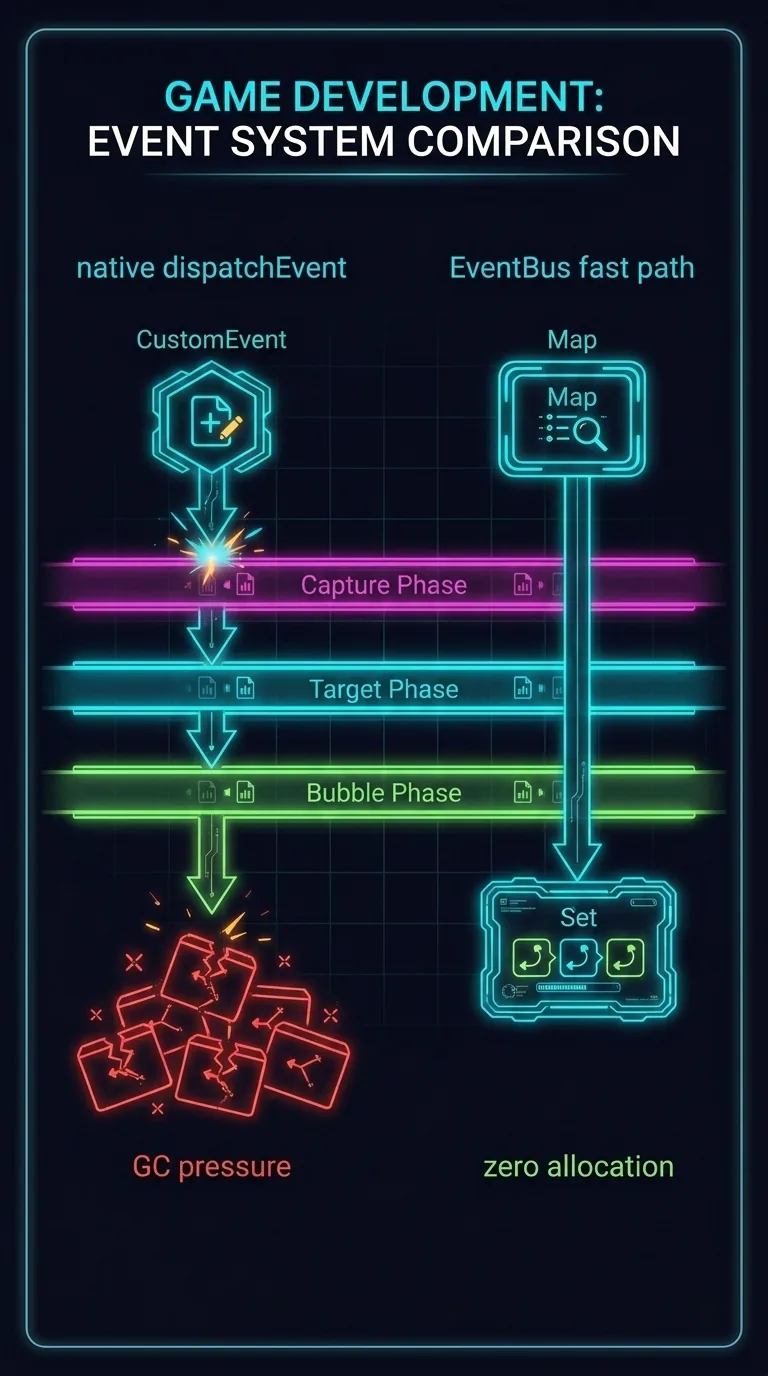
The bus works differently. It uses a Map of event names to Sets of callbacks. A Map is a labeled lookup table. Hand it a key and it returns a value right away. A Set is a list that holds no duplicates. Here is the real on() that builds that index, from source:
Subscribing drops a callback into a Set keyed by the event name. Emitting is the reverse. Look up the Set and call each callback with the data directly:
That forEach builds nothing. Every time a program makes a new object, the computer has to find room for it in memory. That work adds up. So the cheapest dispatch is one that makes no new object at all. Here the data passes to each callback by referencePassing the same object directly rather than copying it, so no new allocation happens.. Dispatch is a Map.get plus a Set.forEach of plain calls. That is the bus's fast pathThe bus's default emit route: a Map lookup plus a Set iteration that allocates nothing., the default for every emit().
| Per emit | Native dispatchEvent | EventBus fast path |
|---|---|---|
| Object created | one fresh Event (can't be pooled) | none — data passed by reference |
| Dispatch work | target-phase machinery + event-path bookkeeping | one Map.get + Set.forEach |
| Payload access | boxed in e.detail.value | the value itself, directly |
| GC pressure at volume | thousands of short-lived objects a frame | zero allocation |
Why native costs more
dispatchEvent cannot be that lean. The spec requires more. Re-dispatching an in-flight Event throws an error. And type and detail are read-only after construction. So a fresh object is made on every emit. At thousands a frame, those short-lived objects feed the garbage collector. A GC pause is the exact hitch that turns a smooth 60fps into a stuttery one. There is more. Even a detached EventTarget runs the target-phase machinery. It also maintains defaultPrevented, composedPath(), isTrusted, and the rest. Do not worry about the exact names. They are extra bookkeeping the spec does that a game's internal messaging never reads.
Event pooling and entity-routed dispatch
The fast path keeps the bus from ever being slower than native. Two more features make it faster. Neither has an EventTarget equivalent.
The first is event poolingReusing a fixed ring of pre-allocated event objects instead of creating a new one per emit, to avoid garbage.. Sometimes the bus does need a wrapper object. This happens when an event is emitted mid-dispatch and gets queued behind the one being handled. Even then, the bus does not allocate a new object. It pulls from a fixed ring of reusable event objects, built once at startup and recycled forever:
Native can't reuse a dispatched Event. So this avoids the GC pressure, which is native's biggest weakness at volume.
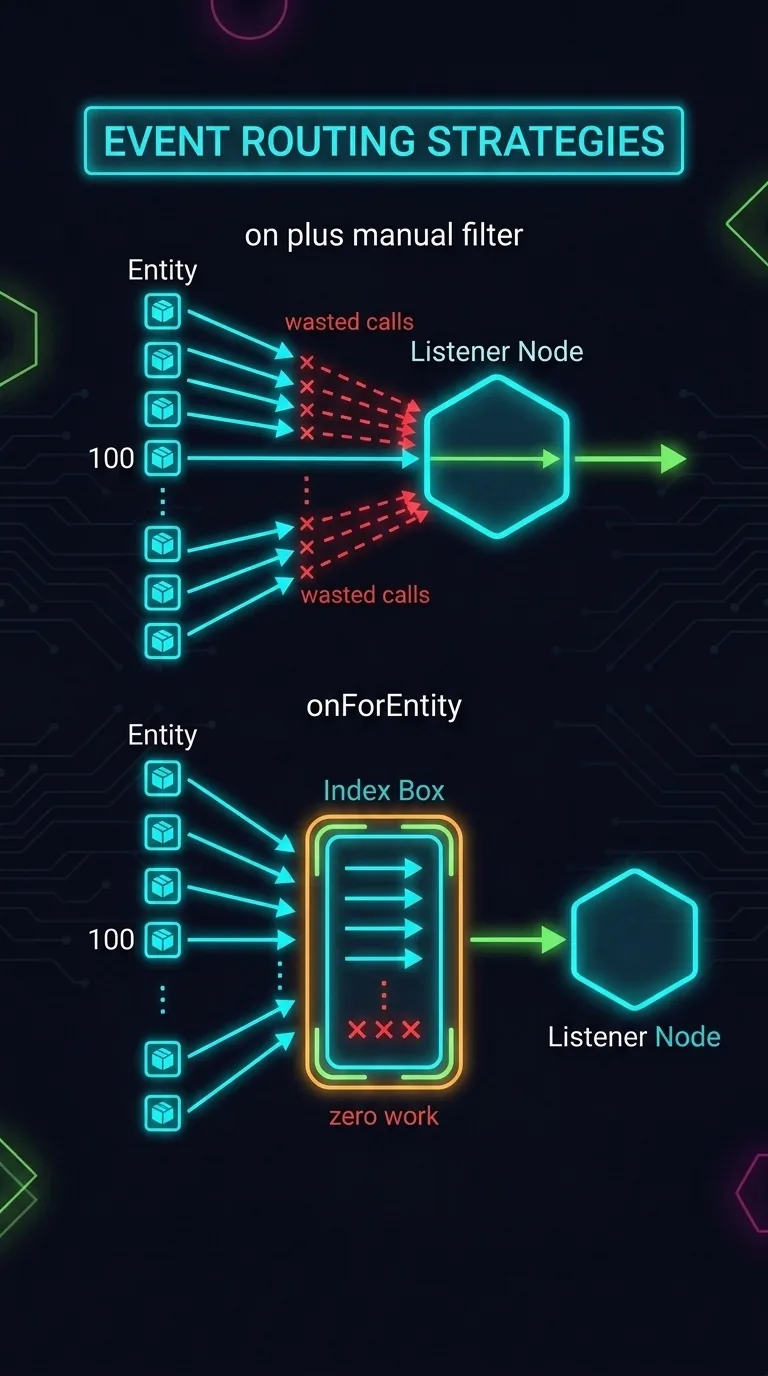
The second feature changes the algorithm, not just the constant: entity-routed dispatch. This is the onForEntity you met in the events lesson. With addEventListener, a listener for one entity in a crowd fires for every match and filters by hand. The bus works differently. It indexes entity-scoped listeners by (eventType → entityId → callbacks). So an emit for an unwatched entity does zero work for that subscriber:
| With N emitters, 1 watched entity | on() + manual filter | onForEntity() |
|---|---|---|
| Callbacks fired per frame | N (then discard N−1) | 1 |
| Cost as the crowd grows | O(N)Linear cost - the work grows in proportion to the input size. — scales with emitters | O(1)Constant cost - the work doesn't grow as the input grows. — flat |
| Where the filtering happens | inside your callback, every time | in the bus index, once |
In a city of thousands of NPCs, that is a free HUDHeads-up display - the score, health, and other readouts drawn on top of the game. listener instead of a per-frame scan of the whole crowd.
A checklist for reducing event cost
The defaults are already the fast ones. When a scene gets heavy and the bus shows up in your profiler, the fix is almost never a faster bus. The fix is to emit less. Work the list in this order:
- Are you emitting unchanged values? The cheapest dispatch is no dispatch. Switch HUD- and UI-facing emits to
emitChanged. It fires only when the value actually differs from last frame. A score that holds at 4,500 for 300 frames goes from 300 dispatches to one. It is the biggest win for the smallest change: one extra character at the call site. - Is a listener filtering a crowd by
entityIdby hand? Move it toonForEntityand let the index do the routing. - Only then worry about raw throughput. And the answer is the bus you already have. It beats
CustomEventon the thing that matters at volume: allocation.
The browser's events are built for the DOM. The DOM is a tree, with propagation and rich metadata. A game's internal messaging is different. It is a flat, high-frequency, fire-and-forget channel. The right tool for that is a Map of Sets of callbacks that never allocates when it doesn't have to. The browser's events stay at the edges, wiring DOM buttons to world.getEventBus().
Where the course leaves you
Two seams shape everything you built. The renderer adapter is why your components are portable. They can only speak an interface, and the interface speaks every engine. So the choice of BabylonJS or Three is one line at the edge of the program. The EventBus is why your systems are independent and cheap. They announce instead of command, and the announcing costs nothing because it allocates nothing.
You started this course unsure whether composition could really replace an inheritance tree. You end it having done real work. You wrote components and systems against the real published framework. You found a system's entities with five filters. You wired a whole game through events. You declared scenes as data. You composed gameplay from parts that were built separately. You pooled away the spawn-time stutter. And you put your hand on a live slider. Every chunk of library code you read was a verbatim slice of the source that ships in production. Go build something that emits a few thousand events a frame, renders it in two engines, and never drops below 60.